How to Connect TidyCal to n8n with the HTTP Request Node
To connect TidyCal to n8n, create a TidyCal personal access token, save it as a Bearer Auth credential in n8n, then send a GET request to https://tidycal.com/api/booking-types. The endpoint lists the booking types in the authenticated TidyCal account. It is a read-only first call before you build a workflow around bookings or contacts.
TidyCal's API requires a paid TidyCal plan. This guide follows TidyCal's API reference and help center, plus the HTTP Request fields visible in n8n. The endpoint returned 401 Unauthorized when checked without a token. The response fields below come from TidyCal's API reference, so compare them with the output your own account returns.
What you need
- A TidyCal account on a plan with API access. TidyCal's API setup guide lists Individual, Pro, and Agency plans.
- Access to an n8n editor where you can create a workflow and credential.
- A personal access token from your own TidyCal account. Keep it out of screenshots, URLs, and workflow text fields.
Step 1: Create a TidyCal personal access token
Sign in to TidyCal and open Integrations → Automations. Scroll to the API card and click Manage API keys. In the Personal tokens tab, click Create token, give it a name you will recognize in n8n, and click Create. Copy the token when TidyCal shows it; the official instructions say it is shown only once.
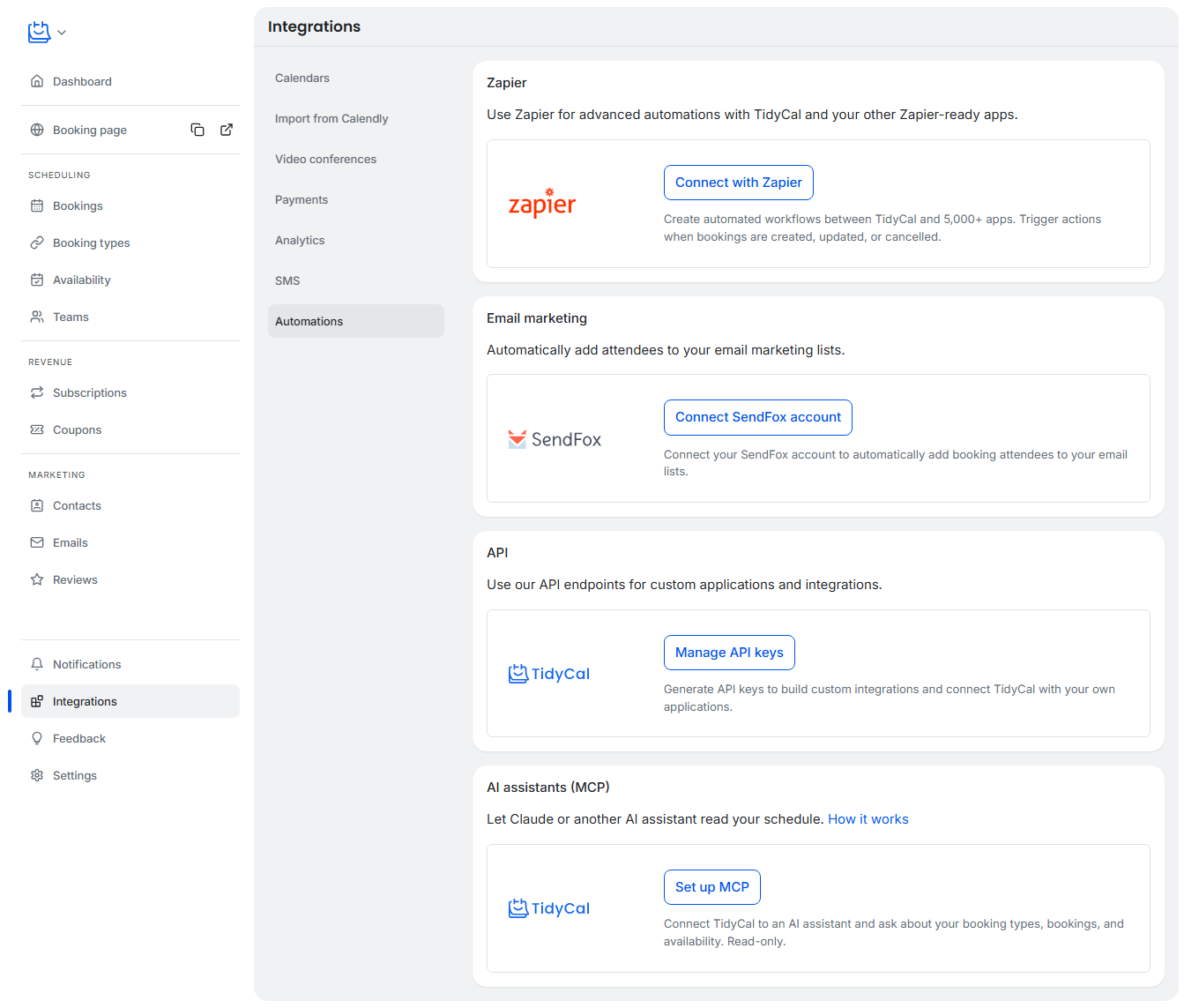
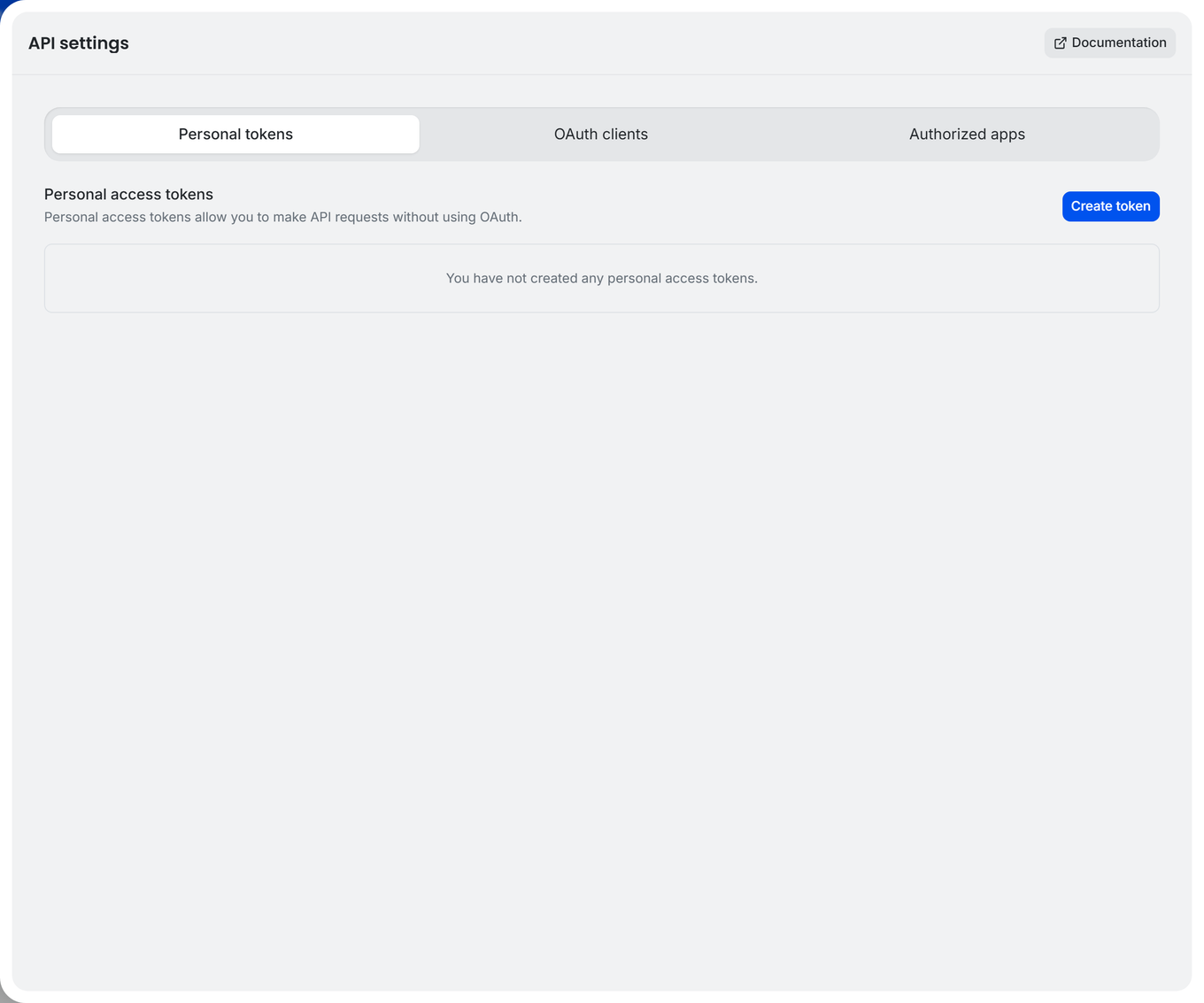
Both screenshots are from TidyCal's own help center. Its current help article calls the section Automations; its developer reference also mentions Advanced. Follow Manage API keys in your signed-in account if the section name differs.
Step 2: Store the token in an n8n credential
Create a workflow in n8n with Trigger manually, then add an HTTP Request node. Open the node's Parameters tab. Under Authentication, choose Generic Credential Type. Set Generic Auth Type to Bearer Auth, then create a new Bearer Auth credential and paste the TidyCal token into its token field. Name the credential TidyCal personal token or another clear name and save it.
n8n sends bearer credentials in the Authorization header. TidyCal expects Authorization: Bearer YOUR_TOKEN, so do not add a second manual Authorization header. Check the selected credential name before testing; a credential for another service will not authenticate a TidyCal request.
Step 3: Configure the read-only request
Set these HTTP Request parameters:
| Field | Value |
|---|---|
| Method | GET |
| URL | https://tidycal.com/api/booking-types |
| Authentication | Generic Credential Type |
| Generic Auth Type | Bearer Auth |
| Bearer Auth credential | Your saved TidyCal credential |
| Send Query Parameters | Off for the first request |
| Send Headers | Off; Bearer Auth supplies the Authorization header |
| Send Body | Off |
TidyCal documents this exact List booking types endpoint. Do not use a public booking-page URL here; the REST API path starts with https://tidycal.com/api/.
Step 4: Execute and read the response
Click Execute step. If the token, account access, and endpoint are correct, n8n should show a JSON response in OUTPUT. TidyCal's API reference shows a top-level data array for this endpoint. Each booking type can include fields such as id, title, duration_minutes, url_slug, and url.
Read the actual item returned by your account before mapping fields into another node. An account with no booking types can return an empty data array. Titles, IDs, URLs, and the number of items are account-specific; the sample values in TidyCal's docs are examples, not results from this workflow.
For a quick check, confirm that the output contains data and inspect the first booking type's title and duration_minutes if the array is not empty. Save a redacted screenshot of the n8n settings and output only after a successful authenticated run. Never include the token or private booking details in a public article.
Fix common connection errors
401 Unauthorized: TidyCal rejects the request when the token is missing, invalid, or not sent as a bearer token. Confirm that the selected n8n credential is the TidyCal credential and that Generic Auth Type is Bearer Auth. The endpoint returned 401 in a no-token check for this guide.
The API controls are missing in TidyCal: Confirm that the account has API access. TidyCal's help center lists API access on paid Individual, Pro, and Agency plans. If your account has access but the navigation differs, find Manage API keys inside Integrations.
Wrong URL or empty output: Check that the URL is https://tidycal.com/api/booking-types. A successful response with data: [] means the request worked but returned no booking types for that account. A request error is different; inspect n8n's error message and TidyCal's response before changing other settings.
Too many requests: TidyCal's help center states a limit of 60 API requests per minute per account. For a scheduled workflow, keep the polling interval and number of requests inside that limit. Fetching the first page is enough to prove this connection; if you later need every booking type, check TidyCal's page parameter and response before configuring pagination.
Turn the response into one item per booking type
The HTTP Request node returns the whole response as one item, with the booking types inside data. Most later nodes work better with one item per booking type. Add a Split Out node after the request and set Fields To Split Out to data. Each booking type then becomes its own item, and you can map {{ $json.title }} or {{ $json.duration_minutes }} directly in the next node.
A simple first workflow looks like this:
| Step | Node | What it does |
|---|---|---|
| 1 | Manual Trigger or Schedule Trigger | Starts the workflow |
| 2 | HTTP Request | GET https://tidycal.com/api/booking-types with your Bearer Auth credential |
| 3 | Split Out | Splits data into one item per booking type |
| 4 | Filter (optional) | Keeps only the booking types you care about, for example by title |
| 5 | Google Sheets, Slack, or another node | Uses each booking type's fields |
Run the workflow once with Execute workflow and check the item count after Split Out against the number of booking types in your account.
Fetch more than one page
The list endpoint accepts a page parameter. If your account has more booking types than one response returns, use the HTTP Request node's built-in pagination instead of building a loop:
- Open Options → Add option → Pagination.
- Set Pagination Mode to Update a Parameter in Each Request.
- Add a parameter with Type
Query, Namepage, and Value{{ $pageCount + 1 }}. Check TidyCal's reference to confirm the first page number. - Set Pagination Complete When to Other with the expression
{{ $response.body.data.length === 0 }}. - Set Limit Pages Fetched to a safe maximum while you test.
Each page arrives as a separate item, so keep the Split Out node after the request. Confirm the stop condition against TidyCal's documented response before you rely on it in a scheduled workflow.
Stay inside the rate limit
With a 60-requests-per-minute limit per account, a workflow that loops over many items can hit the limit quickly. Two built-in settings help:
- Options → Batching on the HTTP Request node sends requests in batches. For example, 10 items per batch with a 10,000 ms interval keeps the node around 60 requests a minute.
- Settings → Retry On Fail retries a failed request after a wait. Use a wait of several seconds so a brief 429 response has time to clear.
Count every workflow that uses the same TidyCal account, because the limit is shared across them.
After the first request works
The HTTP Request node is a direct way to call TidyCal's API, but each new operation needs its own method, URL, inputs, and response handling. The NativeShip guide to choosing HTTP Request or a custom node explains when that work is worth packaging into a dedicated integration. For a concrete TidyCal example, read how we built the TidyCal community node from its OpenAPI specification. That package still has an authentication mismatch under review, so use the HTTP Request setup above for this guide's TidyCal connection. How to check a community node before installing it walks through that review, and choosing API operations for an n8n node shows how the booking flow maps to node actions. The NativeShip node directory lists ready-made nodes for other services.
Frequently asked questions
Use n8n's HTTP Request node. The URL starts with https://, which makes this an HTTPS request.
TidyCal's current help center lists API access on paid Individual, Pro, and Agency plans. Check your account's API card if your plan or entitlements have changed.
Enter the token itself in a Bearer Auth credential. n8n adds the bearer authorization format when it sends the request. Do not also add a manual Authorization header.
A token can authenticate requests allowed by its TidyCal account. Name and manage credentials so you know which account each workflow uses, and delete or replace a token in TidyCal if it is exposed.
The request succeeded, but the authenticated account returned no booking types. Check that the token belongs to the account you expect and that the account has booking types. If you use pagination, an empty data array on a later page is also the normal stop signal.
No. GET /api/booking-types reads booking types. Creating or changing TidyCal data uses other documented endpoints and requires its own inputs and tests.
Yes. Keep the TidyCal credential, then use the method, path, parameters, and body in TidyCal's API reference for each new operation. Test read-only calls first and inspect each endpoint's real output.



